Configuring a Course Basics - Questions and Answers
11. Add blocks to my course
Blocks are items which may be added to the side of any page in Moodle and add extra information or learning content to your course/
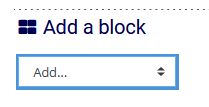
If desired, you can add side blocks to your course. In this Moodle, the blocks are on the right (unless you are using a really small screen. In the latter case, side blocks appear underneath the main course content). To add blocks in your course, editing must be turned on. Then, select from the Add a block drop down list , the type of block you would like to add (bottom right, underneath the course administration block)
A very useful block is the HTML block, a standard block used to add text, multimedia, widgets etc. to a site front page or course page.
Moodle Resourses:
Moodle Docs: https://docs.moodle.org/39/en/Blocks